TMT (Talent Management Team) Manager
Who this is for: Talent Management Team managers.
Time: ~9 minutes.
You'll need: the management.tmt.retainer_mapping and
management.tmt.affiliate_mapping modules — one per board, granted
individually. Read
Department Managers — the basics first.
Everything in the manager basics guide applies to you — Time Validations and Leaves & Absences work the same way. This guide covers the two mapping surfaces that decide who gets paid for managing and referring models.
The third TMT-only tool, Model Performance — the weekly KPI sheet and monthly report — has its own guide: Model Performance.
The TMT management landing
Open Management and select the TMT tab. Alongside Time Validations and Leaves, you get the TMT toolset:
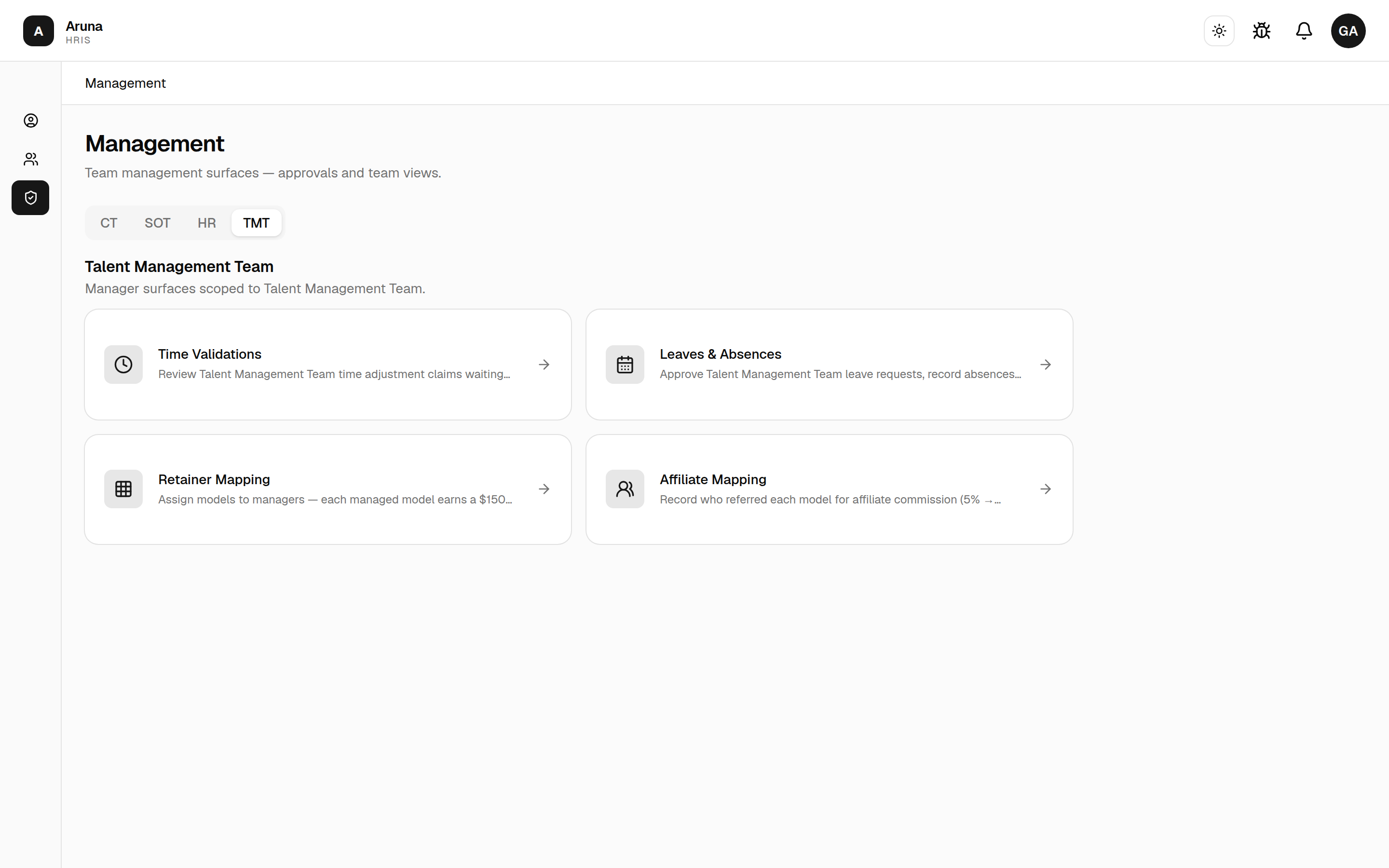
- Retainer Mapping — assign models to managers; each managed model earns the manager a $150 retainer per cutoff.
- Affiliate Mapping — record who referred each model, which drives affiliate commission (5% → 2.5%).
- Model Performance — the weekly metrics and KPI checklist per model, plus the monthly report. Covered in its own guide.
These two surfaces are different from the CT/SOT tools. They are standing configuration, not per-cutoff data entry. You set an assignment once, and the system carries it forward into every cutoff automatically until you change or remove it. There's no cutoff picker — you're editing the ongoing rules, not a single period.
How TMT pay is built
TMT managers earn in two ways, and each maps to one surface:
- Retainer — a flat $150 per model per cutoff for every model a manager owns. Driven by Retainer Mapping.
- Affiliate commission — a percentage of a referred model's net OF revenue, paid to whoever referred that model. Driven by Affiliate Mapping.
Both are materialized by Finance's payroll Pull/Sync — you don't "run" them. You keep the mappings correct; the figures then land on the right payslips automatically. There is no TMT pay-breakdown screen in the management area (unlike CT/SOT); the numbers surface in Finance's payroll review.
1. Retainer Mapping
Open Retainer Mapping. This is the standing record of which manager owns which model. Each owned model pays that manager a $150 retainer every cutoff.
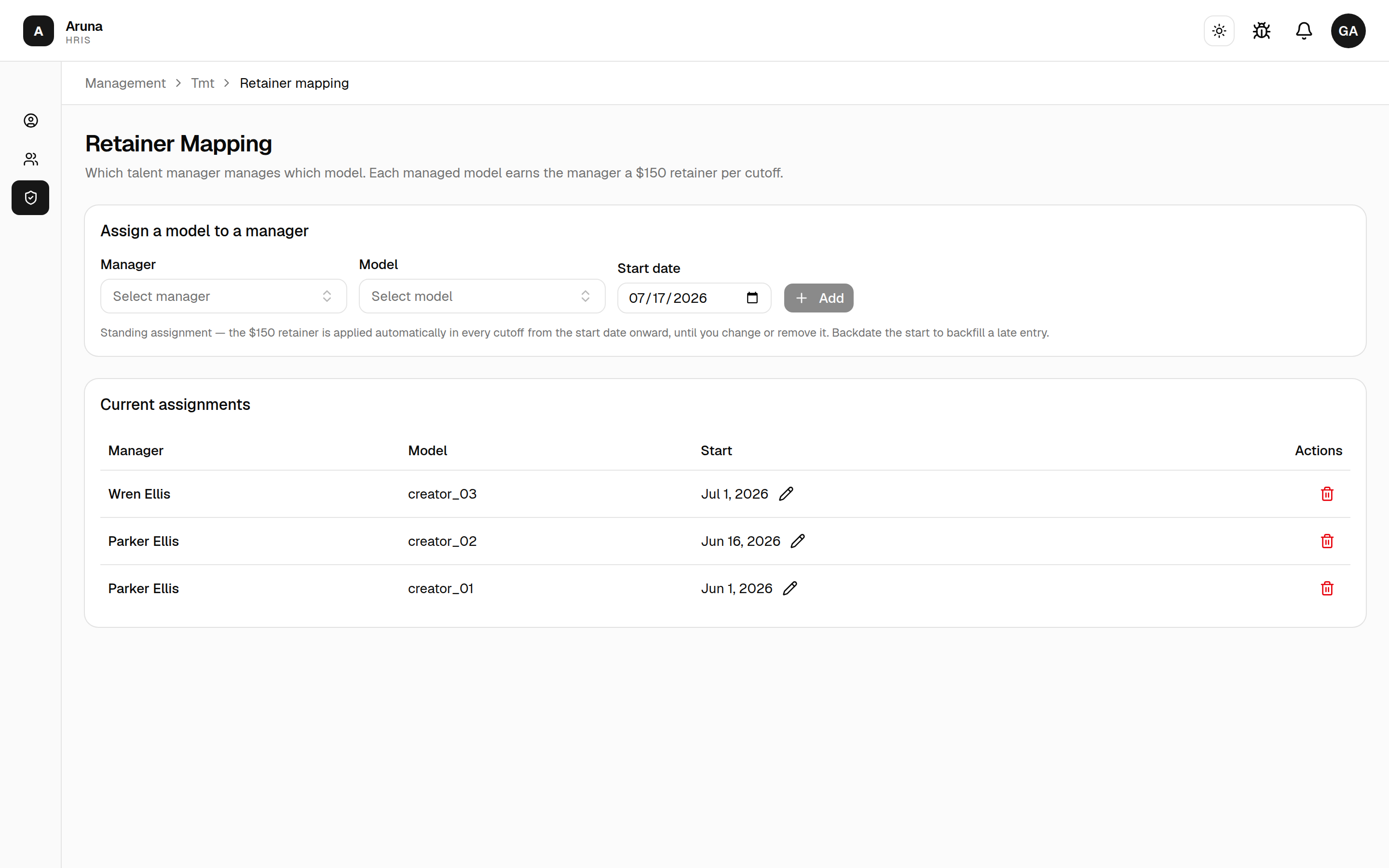
Assign a model to a manager
In the Assign a model to a manager card:
- Manager — the TMT employee who will earn the retainer. Search by name or employee code.
- Model — the model they manage. Search by handle.
- Start date — defaults to today. The retainer applies from this date onward; backdate it to backfill a late entry (e.g. the manager has owned the model since the 1st but you're only recording it now).
- Click Add.
Standing assignment. Once added, the $150 retainer is applied automatically in every cutoff from the start date onward, until you change or remove it. There is no end date and no per-cutoff re-entry — it just keeps paying each period.
The rules that matter
- One live manager per model. A model can have only one current retainer owner. If you try to assign a model that's already assigned, the add fails ("is this model already assigned?"). Remove or reassign the existing row first.
- Start date bounds backtracking. A late entry earns the retainer for cutoffs on or after its start date — not for all history. Set it to the true start.
- $150 is the default rate — and it's set by Finance, not you. The per-model fee is a single system-wide setting Finance edits in Finance → Payroll → Records (the TMT pay section has a "Retainer fee per model" field). As a TMT manager you don't control the amount; you only decide who manages which model. Whatever that config holds is the amount applied per managed model.
Current assignments
The Current assignments table lists every live mapping (manager, model, start date). From here:
- Edit the start date inline — click the date cell, pick a new date, save. Use this to correct a backdate or shift when the retainer begins.
- Remove (trash icon) — opens a confirm dialog. Removing it means the manager stops earning the retainer for that model from the next pull/sync onward. Deleting the row is how you "end" an assignment (there's no end-date field).
2. Affiliate Mapping
Open Affiliate Mapping. This records who referred each model, so the referrer earns affiliate commission on that model's revenue.
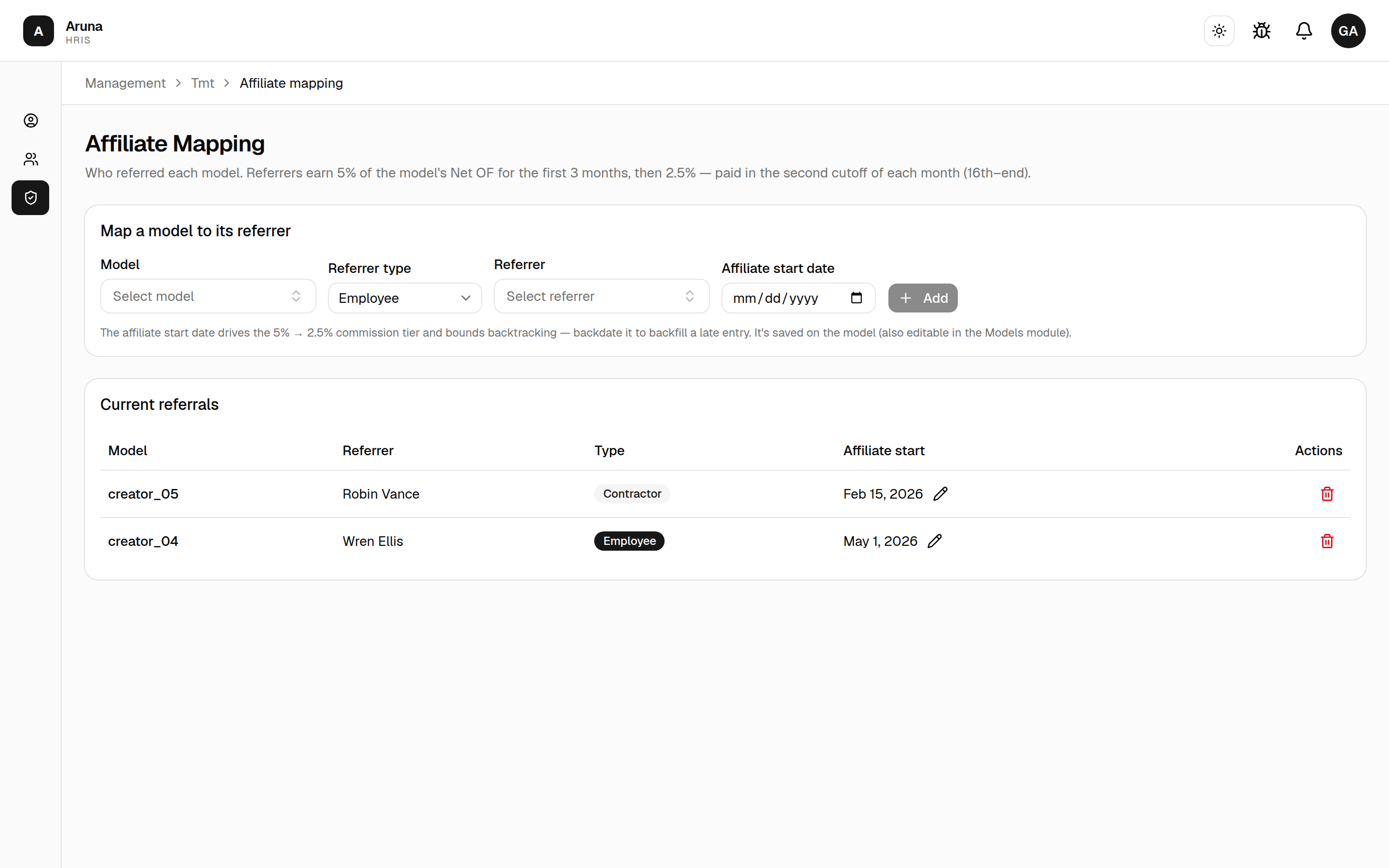
Map a model to its referrer
In the Map a model to its referrer card:
- Model — the referred model. Picking one seeds the affiliate start date from whatever the model already has (so you don't overwrite it by accident).
- Referrer type — Employee or External contractor. This toggles the referrer list below between staff and contractors.
- Referrer — the person who referred the model. Exactly one referrer per model (an employee or a contractor, never both).
- Affiliate start date — the date the affiliate relationship began. This is the single most important field (see below). Backdate it to backfill.
- Click Add.
The 5% → 2.5% commission tier
Affiliate commission steps down over time, keyed entirely off the affiliate start date:
- 5% for the first 3 months from the affiliate start date, then
- 2.5% lifetime thereafter.
The percentage is applied to the model's net OF revenue for that calendar month, and the payout is invoiced once a month on the second cutoff — the monthly payout cutoff, the same one SOT commission uses. A month that straddles the 3-month anniversary is split — the days before the anniversary earn 5%, the rest 2.5%.
The affiliate start date lives on the model, not on the referral row. It's the single source of truth for the tier, so it's shared with the Models module (Finance can also set it there). Editing it here updates the model. Setting the right start date is what makes the 5%/2.5% split land correctly, so get it right when you add the referral.
Employee vs. external contractor referrers
- Employee — an Aruna staff member; the commission lands on their payslip.
- External contractor — a non-staff referrer tracked under Finance's external contractors; the commission is paid out through that channel, not a payslip.
The Type badge in the table shows which kind each referral is.
Current referrals
The Current referrals table lists model, referrer, type, and affiliate start date. From here:
- Edit the affiliate start date inline — click the date cell, pick a date, save. Because the date drives the tier, this is how you correct a mis-tiered payout.
- Remove (trash icon) — opens a confirm dialog. The model then stops generating affiliate commission for its referrer.
Where the money shows up
Neither surface pays anyone directly — both feed Finance's payroll:
- The $150 retainers materialize as Retainer Fee line items (one per managed model) on each manager's payroll, every cutoff.
- Affiliate commission materializes on the referrer's payroll (employee) or through the external-contractor channel, in the second cutoff of the month.
Both re-materialize on the payroll Pull/Sync, so a mapping change only shows up in pay after the next sync for that cutoff. If a figure looks wrong, fix the mapping here — don't try to adjust the payroll line item directly.
Troubleshooting
| Problem | What to do |
|---|---|
| Can't add a model in Retainer Mapping ("already assigned") | A model has only one live manager — remove or reassign the existing row first |
| Retainer isn't showing on a payslip | Confirm the assignment's start date is on/before the cutoff, then re-run the payroll Pull/Sync |
| Retainer paid for too many/few cutoffs | Fix the start date (it bounds backtracking); delete the row to end the assignment |
| Affiliate commission is the wrong percentage | Check the affiliate start date — it drives the 5% (first 3 months) → 2.5% tier |
| Affiliate commission didn't backfill an earlier month | Backdate the affiliate start date; the tier only earns from that date onward |
| A referral needs a non-staff referrer | Set Referrer type to External contractor (managed under Finance) |
| Changed a mapping but pay didn't move | Mappings only apply on the next payroll Pull/Sync for the cutoff |
Tracking Link Affiliate
A second, separate commission programme. Don't confuse it with Affiliate Mapping above: that one pays a referrer for bringing in a model, on that model's Net OF. This one pays for revenue attributable to a Fanmetrics tracking link, and it is a different rate, a different basis and a different cutoff rhythm.
| Affiliate Mapping | Tracking Link Affiliate | |
|---|---|---|
| Question it answers | Who referred this model? | Who owns this tracking link? |
| Basis | the model's Net OF | hand-entered lifetime-revenue snapshots |
| Rate | 5% → 2.5% after 3 months | a flat 15%, split 10% / 5% |
| Cadence | 2nd cutoff of the month | every cutoff |
Revenue attributable to a link earns 15%, split two ways:
- 10% to the talent manager, on their own payslip;
- 5% to the external affiliate, paid straight to them on the contractor payout rail — it never passes through the manager's pay.
The roster
Opening the board lists the whole Talent Management Team, positioned for the cutoff you pick at the top. It is the "who still owes me a sheet" view: the Sheet column is what you scan.
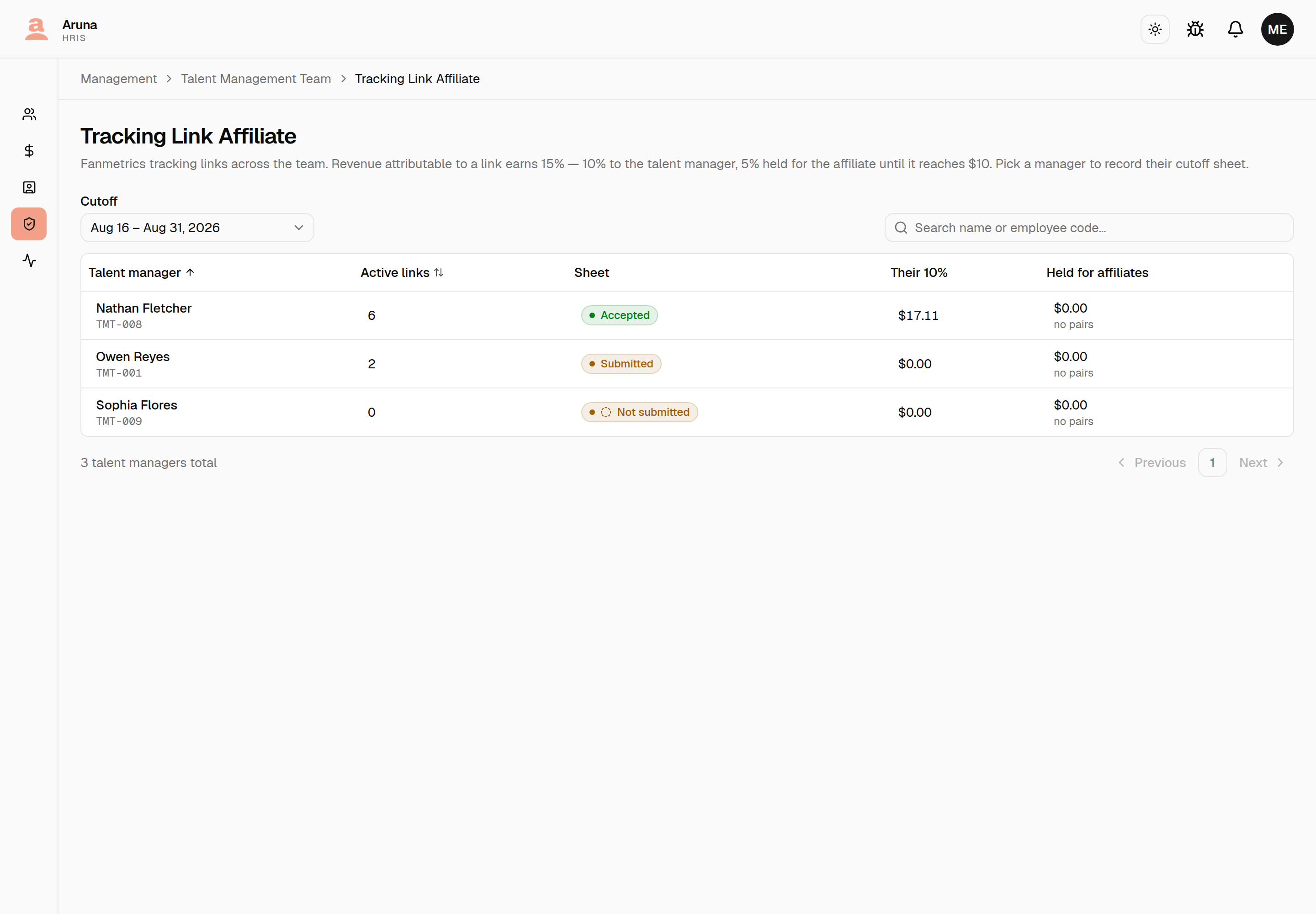
| Sheet | Meaning |
|---|---|
| Not submitted | this manager hasn't filed for the selected cutoff |
| Submitted | filed, waiting on Finance |
| Accepted | Finance approved it — the money is written |
| Rejected | Finance turned it down; it needs re-filing |
Their 10% counts only accepted sheets, so a submitted-but-undecided sheet
shows $0.00. That is correct, not a bug: nothing is owed until Finance
accepts.
Click a manager to open their board.
Links
A link is a row you'll claim against every cutoff. The two identity columns come straight from the tracker workbook:
- Affiliate name — the row's name, e.g.
owen - free trial - Role — the tracking-link slug, e.g.
free-at-2-x-owen
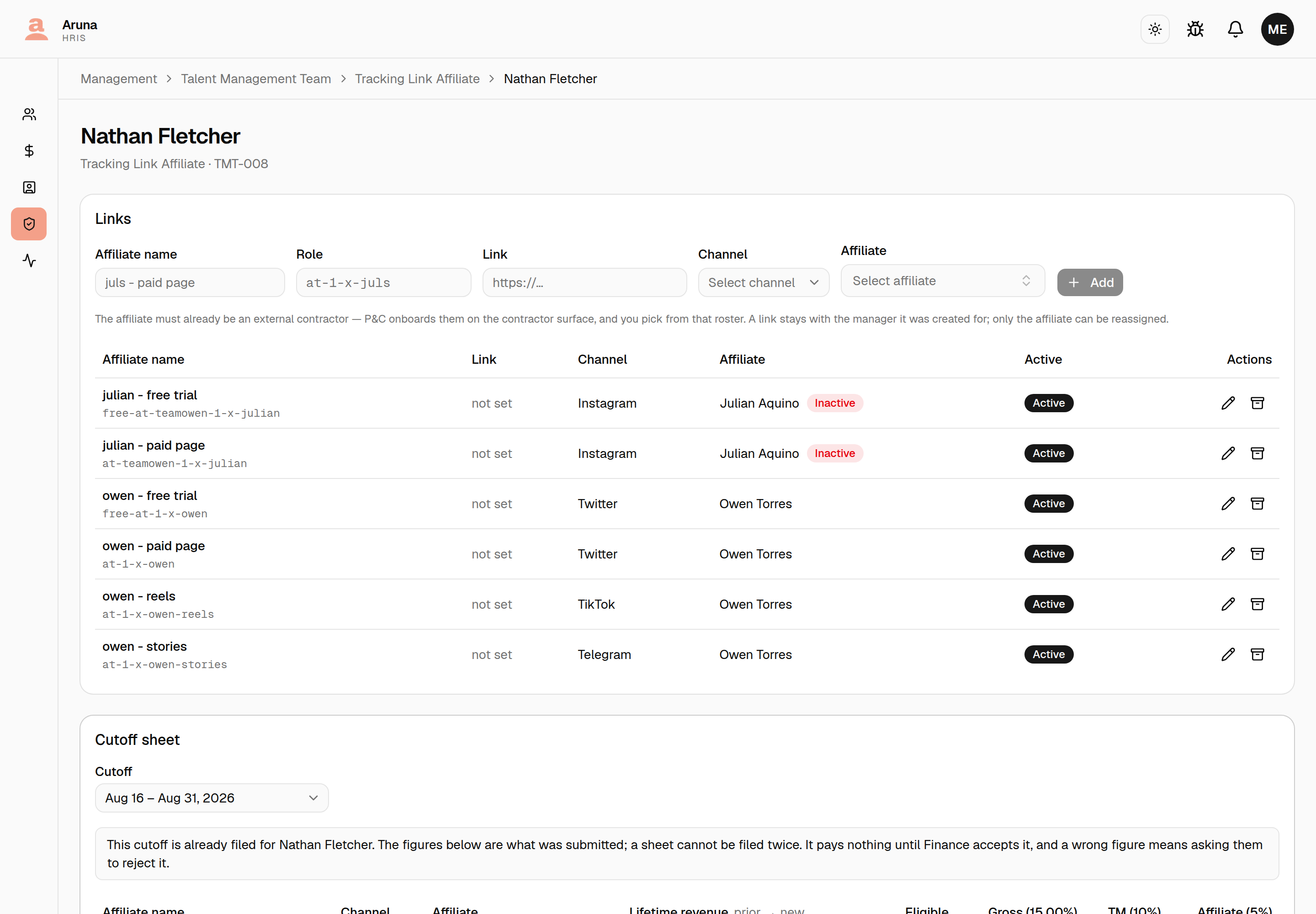
The affiliate must already be an external contractor. P&C onboards them on the contractor surface; you pick from that roster. You cannot create one here, and that is deliberate — it carries wallet, rate and invoice details that belong with P&C.
Editing is behind the pencil in Actions: affiliate name, role, link, channel and affiliate. A link stays with the manager it was created for — only the affiliate can be reassigned, and reassigning changes who the next claim pays. Claims already filed keep the affiliate they were filed against, so no historical money moves.
The archive button retires a link without deleting it; its filed claims stay on the record.
Filing a cutoff sheet
Submission is per cutoff, not per link — one sheet covering every active link, exactly like the workbook this replaces. Pick the cutoff and the sheet arrives pre-filled with each link's prior figure.
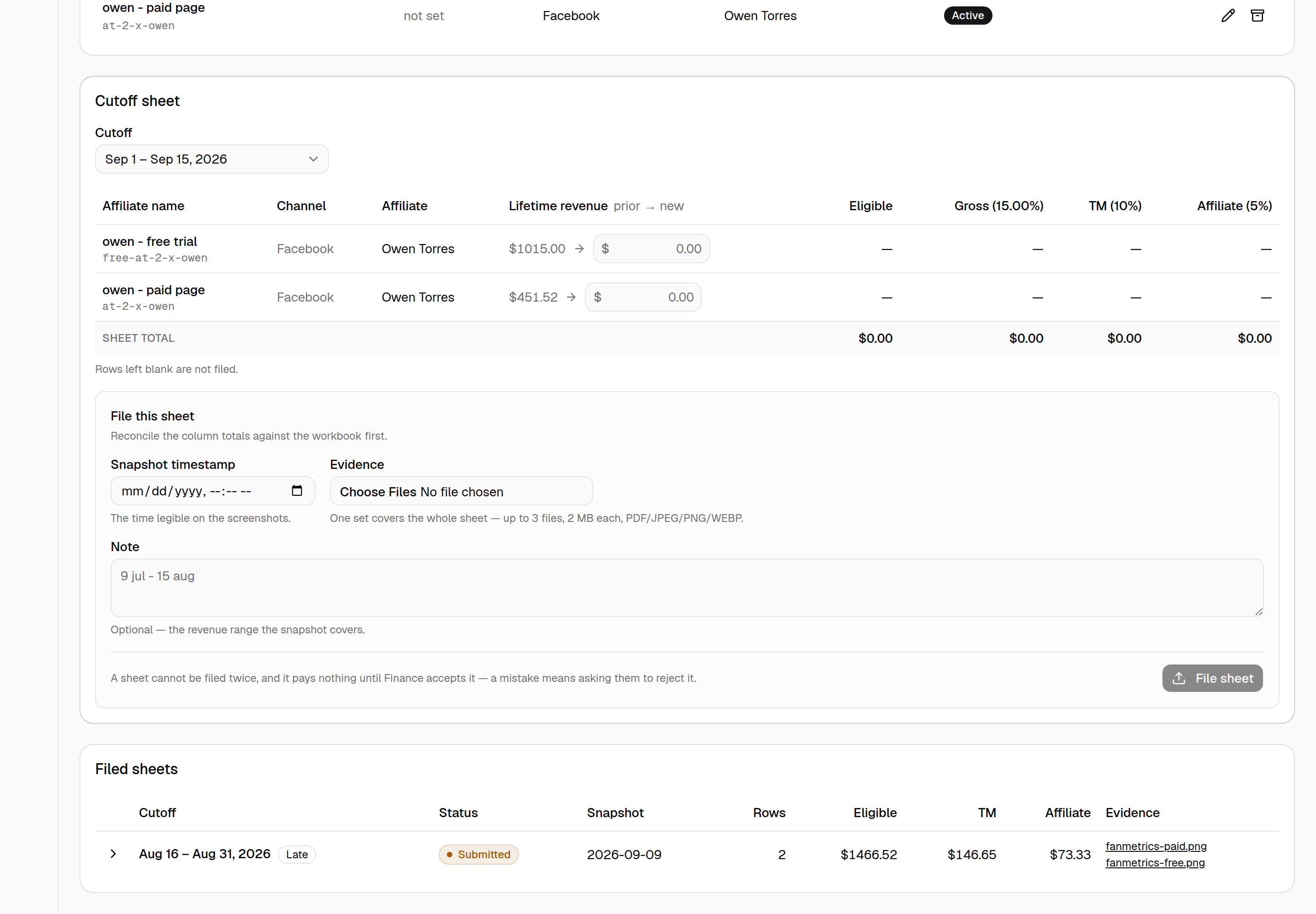
Type each link's new lifetime revenue from Fanmetrics. Everything else is computed live:
eligible = new lifetime revenue − prior
gross    = 15% of eligible
TM       = 10%      affiliate = 5%
The sheet total is what you reconcile against the workbook before filing.
Below the table, attach the sheet:
- Snapshot timestamp — the time legible on the screenshots
- Evidence — one set covers the whole sheet, up to 3 files, 2 MB each
- Note — optional, e.g. the revenue range the snapshot covers
Then File sheet.
Three things that will catch you out
Rows left blank are not filed. Only rows with a figure are recorded, so a link with no new revenue can simply be left empty.
Nothing on a filed sheet can be edited. There is no correction and no edit — a wrong figure is fixed by withdrawing the sheet and filing it again. See Fixing a wrong figure below.
Sheets must be filed in cutoff order. You cannot file an earlier cutoff after a later one: every figure would be measured against a snapshot from the future and read as a chargeback. If you need to, ask Finance to reject the later sheet first.
When lifetime revenue goes down
If a link's new figure is lower than its prior, that's a chargeback. The row is recorded with its negative figure — so the baseline advances correctly — but it pays nothing, and nothing anyone does later makes it pay: there is no positive revenue to pay a percentage of. The rest of the sheet is unaffected and pays as normal.
If the fall was a typo, fix it the same way as any other wrong figure.
Fixing a wrong figure
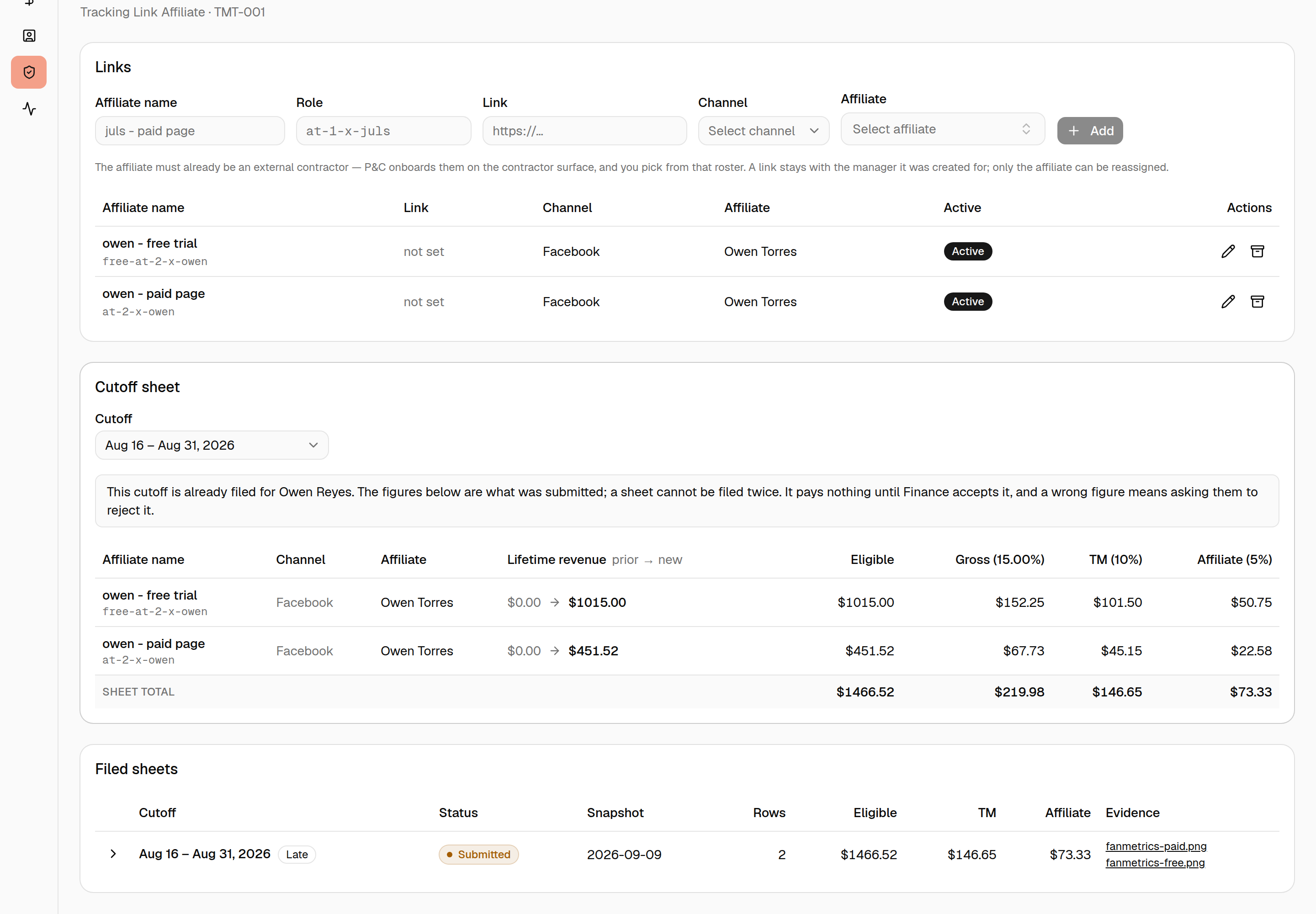
A filed sheet is never edited. It is replaced — re-select the cutoff, press Withdraw sheet, and file it again. The old figures and screenshots stay on the record, the cutoff reopens with its priors recalculated, and the same screenshots can back the new sheet.
Re-selecting a filed cutoff also shows you what was submitted: the figures read-only, Finance's note if they rejected it, and the evidence as links you can open in a new tab to check against the numbers before deciding to replace it.
You can withdraw a sheet in two situations:
- Before Finance decides — you spotted the typo first. Nothing of an undecided sheet has reached a payslip or an invoice, so there is nothing to undo.
- After Finance rejects it — they spotted it. Their note says what was wrong, and rejecting has already taken the sheet off both rails.
Two things that stop it
An accepted sheet cannot be withdrawn. Its 10% is on a payslip and its 5% may be on a contractor invoice. Ask Finance to reject it first — that is what takes it off both rails, and it refuses outright if an affiliate has already been paid from it.
Nor can one with a later cutoff filed on top. A later sheet measured its own starting figure from this one, so withdrawing underneath it would leave that sheet priced against a figure that no longer counts. Deal with the later sheet first — the button says which one is in the way.
Filed sheets
Your filing history, with each sheet's status, totals and evidence. Expand a row to see its rows. Withdrawn sheets stay here — they are the record of what was filed before a re-file, and they pay nothing.
Links you left blank are listed too, marked Not filed, and the Rows column
reads e.g. 5 of 6. Nothing was recorded for them — that is what leaving a row
blank means — but they are shown so a link left out is visible rather than
something you have to notice missing.
Re-selecting a cutoff you have already filed shows what was submitted, read-only — which is also how you check a figure after the fact.
Troubleshooting
| Problem | What to do |
|---|---|
| The affiliate I need isn't in the picker | P&C must onboard them as an external contractor first |
| "An earlier cutoff cannot be filed after a later one" | Ask Finance to reject the later sheet, then file in order |
| "already has a submission for this cutoff" | A sheet is filed once. If a figure is wrong, withdraw it and file again |
| "Revert it to file this cutoff again" | Re-select the cutoff and press Withdraw sheet |
| Withdraw sheet isn't offered | Either the sheet is accepted (ask Finance to reject it), or a later cutoff has been filed and has to be dealt with first |
| A row shows Chargeback | The new figure is below the prior. Check the screenshot; if it's right, file it — the row records but never pays |
| Sheet filed but my 10% isn't on my payslip | It pays only once Finance accepts the sheet |
| The affiliate's 5% hasn't been paid | It's held until that affiliate's balance with you reaches $10 |
| A link's manager is wrong | Ownership can't be changed — archive it and create the link under the right manager |