Models / Agency Ops
Who this is for: staff who manage the agency's model roster and per-cutoff earnings sync. Time: ~4 minutes. You'll need: the Models module (the 🪪 icon in the left nav).
The Models area is the curated roster of OnlyFans accounts the agency manages, plus the per-cutoff refetch / lock controls that pull each model's earnings into the current period.
1. The roster
Open Models.
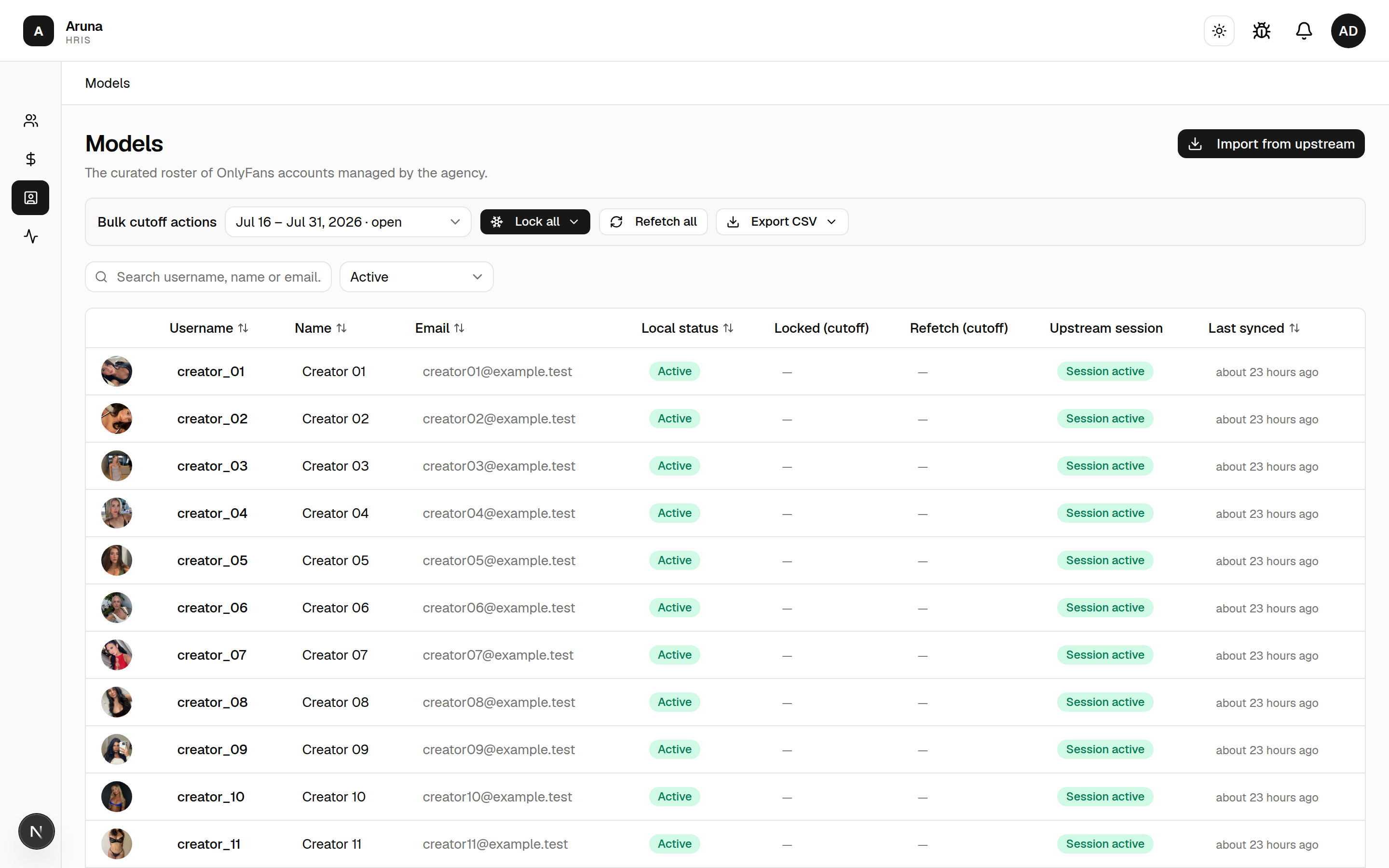
Each row shows the model's local status, its Locked and Refetch state for the selected cutoff, the upstream account, and last synced time. Search and filter at the top; pick the cutoff in Bulk cutoff actions.
The Upstream account column has three states, and they need different fixes — don't confuse them:
| Badge | What it means | What to do |
|---|---|---|
| Session active | The account is listed upstream and its session is live | Nothing |
| Session expired | The account still exists; its upstream session needs re-authing | Reconnect it upstream — not a Replace |
| Account gone | The account is no longer listed upstream at all. It can't be fetched, so the daily ingest skips it and the model has stopped earning | Replace it with the creator's new account |
| — | The model has no OnlyFans account | Nothing, or Attach one |
This column is read live from the upstream roster, so it can disagree with the model's Last synced snapshot — an account whose session dropped yesterday shows Session expired here even though the row was last synced a week ago, when it was fine.
2. Add a model
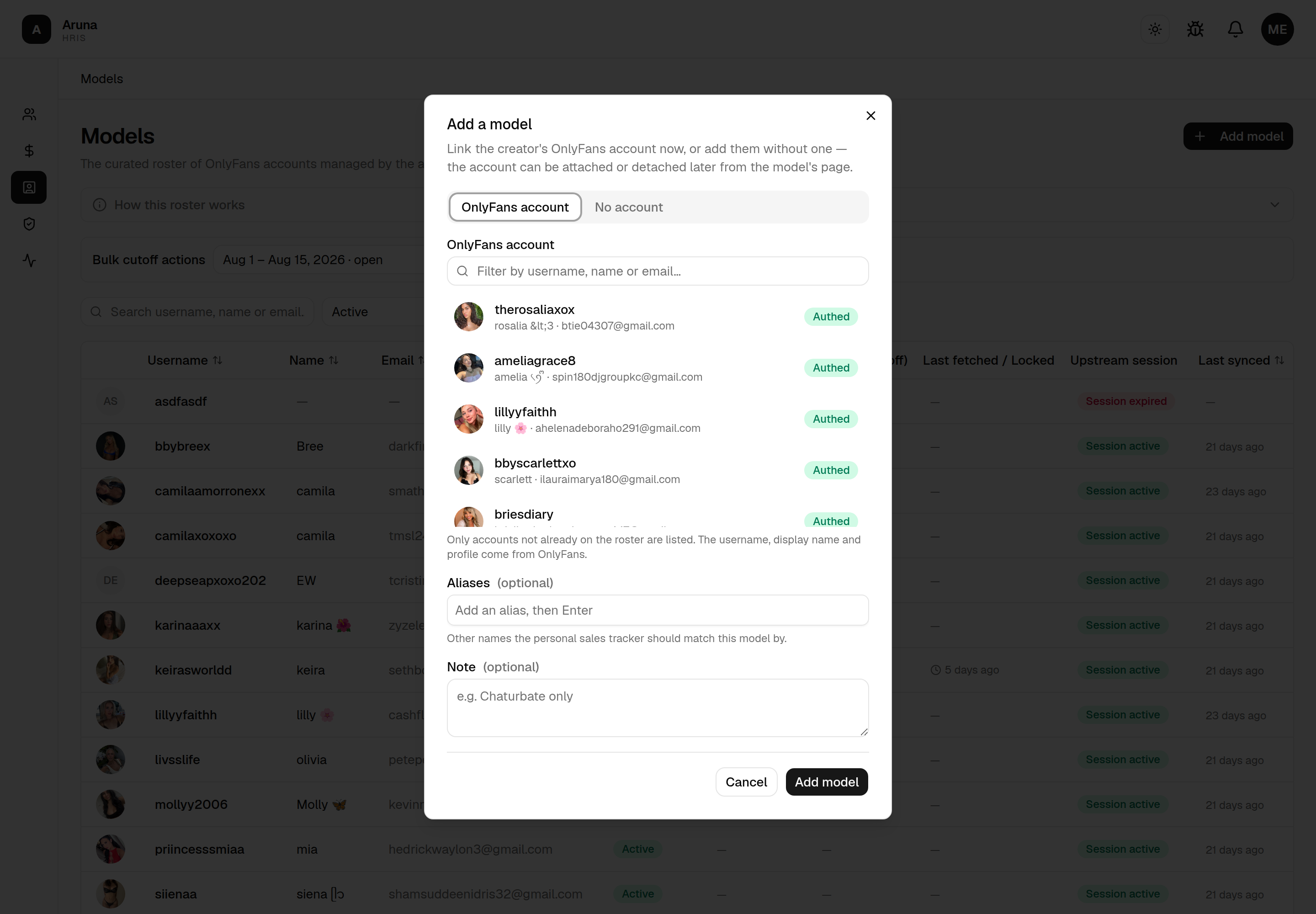
Every model joins the roster the same way: Add model (top right). The OnlyFans account is picked there, while you add the model — there's no separate import step.
The dialog has two tabs. OnlyFans account (the default) lists the upstream roster — filter by username, name or email, then click the account to select it. Only accounts not already on the roster are shown, and the username, display name and profile come from OnlyFans, so you don't type them.
No account is for creators the agency works with outside OnlyFans, e.g. a stream-only model the SOT team schedules sessions for. Type a username (required — it's what shows in the SOT session model picker) and an optional display name.
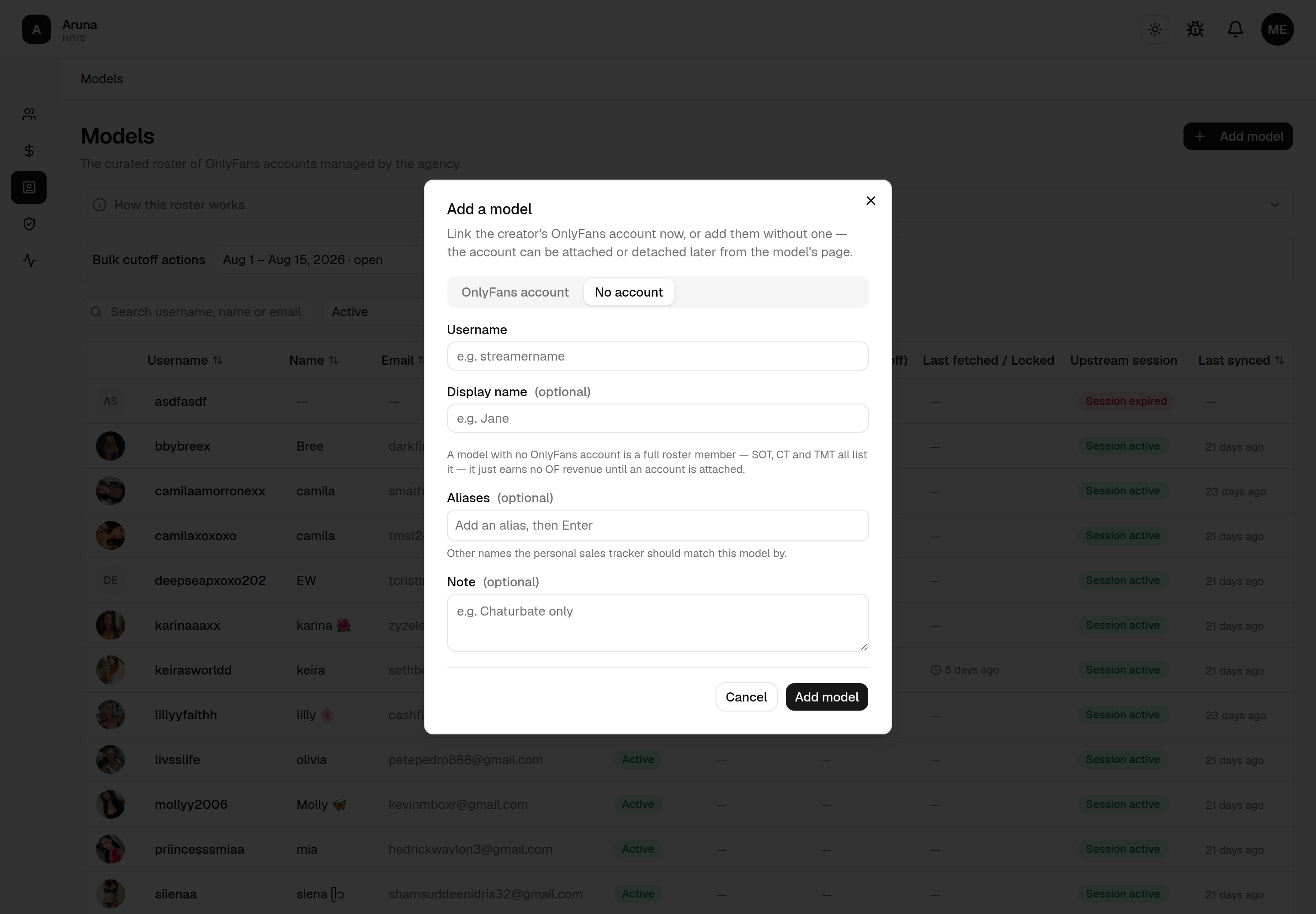
Both tabs share:
- Aliases (optional) — any other names the Personal Sales Tracker should match this model by. Type a name and press Enter to add each one; the PST matcher checks the username and these aliases when reconciling a pasted row.
- Note (optional) — free-form context (e.g. "Chaturbate only").
Add model saves it to the roster immediately. You can edit the aliases or note later from the model's detail page.
A model with no OnlyFans account is a full roster member — it shows in every picker: SOT scheduling, the leave-request assigned-model field, CT coverage teams and the TMT board. It just carries no OF earnings, so commission, retainer and affiliate pay compute zero for it until an account is attached, and its Refetch / Lock / Last synced columns stay blank. Coverage bonuses, which pay for showing up, are unaffected.
3. Attaching and detaching the OnlyFans account
The OnlyFans account is an attribute of a model, not the model itself — it can be linked and unlinked at any time from the model's detail page.
Late registration. If a model with no account later signs up for OnlyFans, don't add a second row. Open its detail page and use Attach OnlyFans account (on the OnlyFans account card) to link the real account onto this same row. Only accounts not already on the roster are offered.
Once attached, the row starts earning: earnings ingest, refetch and lock switch on from the next cutoff, and CT commission, retainer and affiliate pay stop computing zero for it. The model's aliases, note, affiliate date and SOT schedule all carry over, and the old username is kept as an alias so the Personal Sales Tracker still matches it.
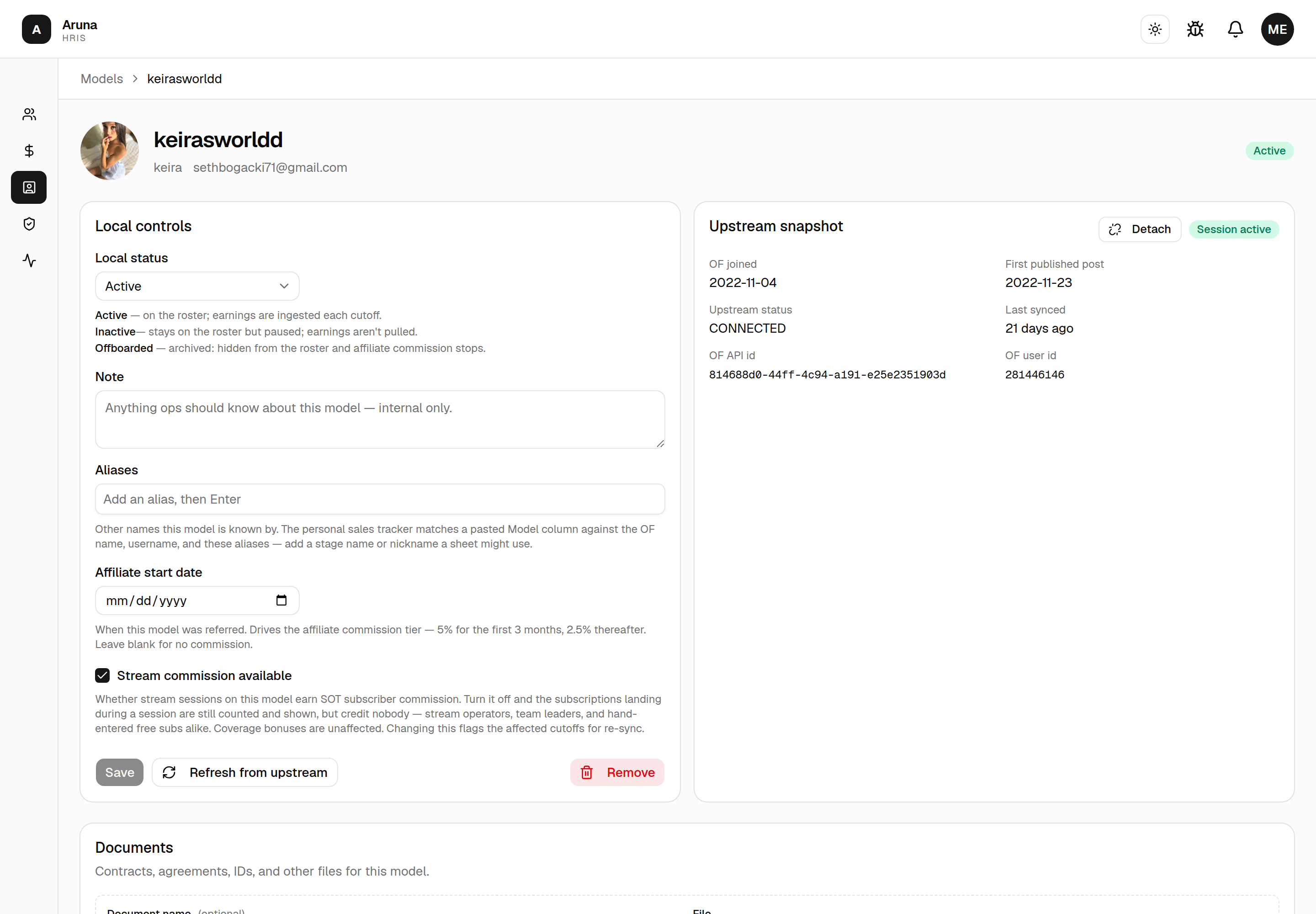
Wrong account linked? Detach (on the Upstream snapshot card) unlinks it and reverts the row to a model with no account, freeing that OnlyFans account to be attached elsewhere. It works on any model with an account, however it got one — but it's a corrective action only, so it's blocked once any cutoff has been locked or earnings ingested for the row. The username and aliases stay put.
The creator moved to a new OnlyFans account
Different situation, different button. When a model's account is gone — banned, deactivated, access lost — and the creator comes back on a new account, you don't want Detach (it'll refuse, because the model has earnings) and you don't want a second row (it would split the creator in two). Use Replace, next to Detach on the Upstream snapshot card.
Replace keeps this model and everything hanging off it — earnings history, aliases, note, affiliate date, SOT schedule, TMT and CT assignments — and just points it at the new account. The old handle is kept as an alias. Add a reason (e.g. "account banned") and it's stored on the model's account-change record.
The trade: cutoffs that closed before the replacement can no longer be refetched or locked-with-fetch. Their figures came from the old account, and re-pulling one would fetch the new account's earnings into that old period — inflating its transactions and overwriting its day-stats. You can still Lock now on those cutoffs to seal what's already stored. The period the replacement happens in legitimately mixes both accounts.
Afterwards the Upstream snapshot card shows "Account replaced on <date>", which is why an older cutoff will refuse a refetch.
Replaced the wrong one? Undo
That same note carries an Undo button. It puts the previous account back and lifts the seal, so the earlier cutoffs are refetchable again. It restores from the change record rather than from OnlyFans, so it works even though the old account is gone upstream — which is the whole reason it exists, since you can't pick a dead account out of the list to swap back to manually.
Undo only reaches the most recent change (do it twice to walk back two), and it stops working once the replacement account has pulled any earnings — at that point the row holds figures from the new account, and pointing it back at the old one would leave them unattributable. Earnings are never touched either way, so nothing is lost while you decide.
4. Refetch & lock a cutoff
From Bulk cutoff actions, Refetch all re-pulls every model's earnings for the selected cutoff, and Lock all freezes them. Both run in the background and can take minutes — rows show Queued → Refetching… → done, and a Cancel all appears while a batch is running.
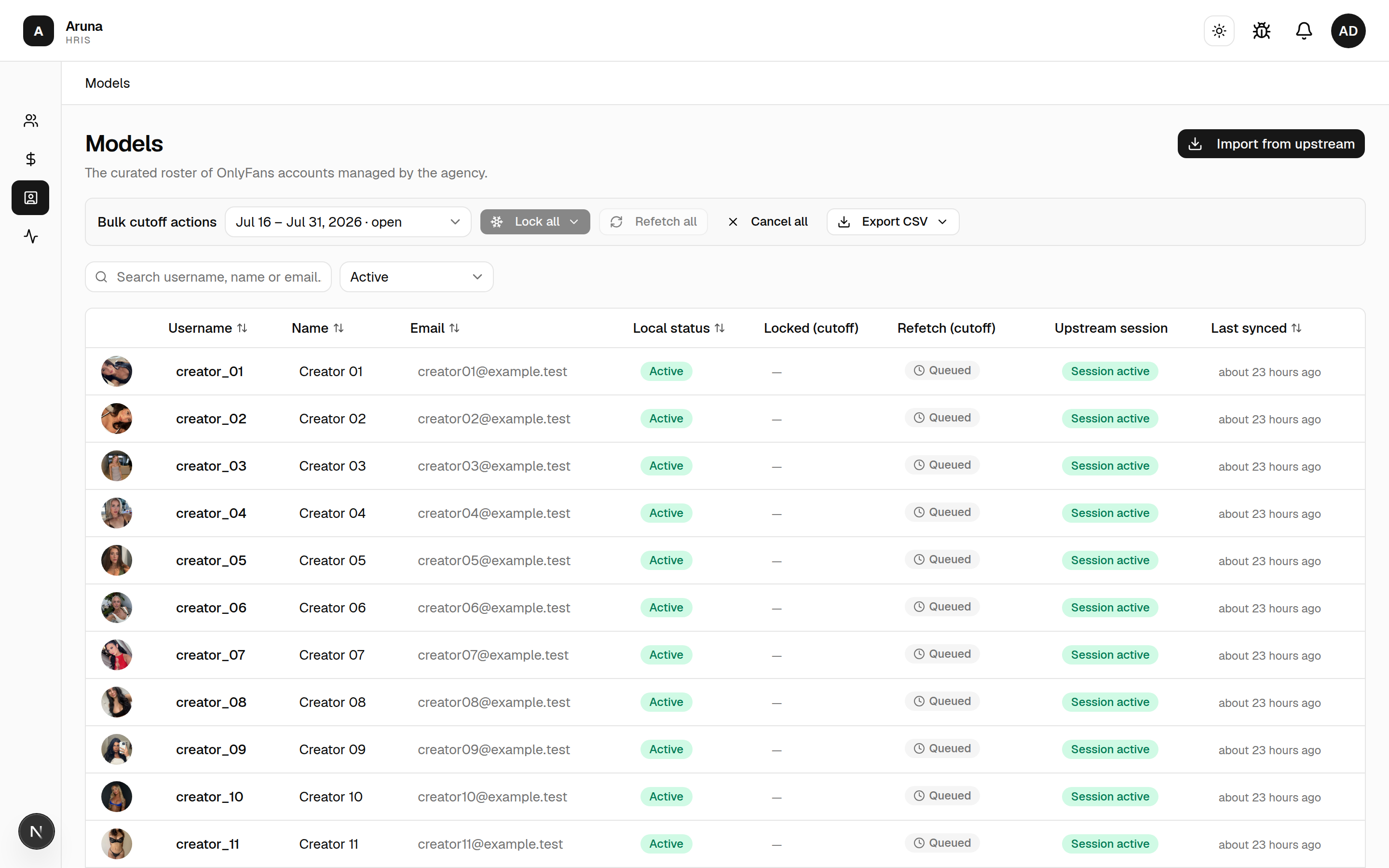
The Last synced time is the real pull time — trust it over the status pill if you're unsure whether a refetch finished. Freeze/refetch runs one model at a time behind the scenes, so a large batch takes a while.
5. Stream commission
A model's detail page has a Stream commission available tick box under Local controls. It's on for every model by default.
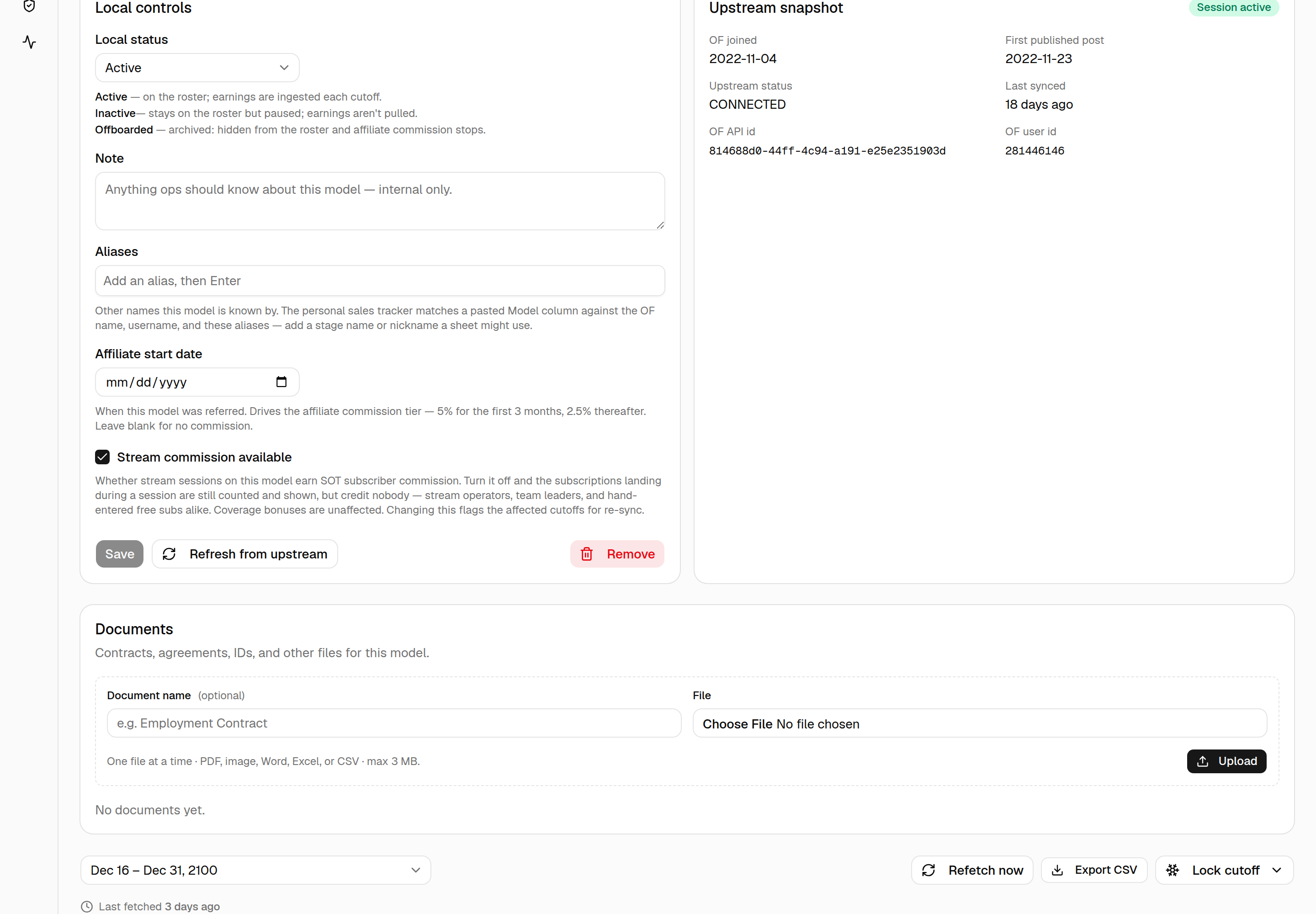
It decides one thing: whether stream sessions on this model earn SOT subscriber commission. Untick it for a model streamed under an arrangement that doesn't pay per subscriber.
With it off:
- The subscriber counts CT records for that model's sessions are still stored and still shown everywhere — the SOT Scheduling Hub, the CT sub-count board, and the Finance breakdown, which names the model and its count so a $0.00 row reads as a decision rather than a bug.
- But they credit nobody — neither stream operators nor team leaders.
- Coverage bonuses are unaffected. Those pay for covering a shift, not for the subs it landed.
Changing this moves money. Ticking or unticking flags the affected cutoffs for re-sync, and the change reaches draft payslips on the next Pull/Sync. Payslips already processed or sent keep their frozen amounts — if you're flipping this after a payroll has gone out, tell Finance.
6. Documents on a model
A model's detail page has a Documents section for record-keeping — for Talent Management / Finance to keep signed agreements, payment-transfer records, IDs, and similar files on the model.
- Give each file a name (separate from the filename), pick one file, and Upload. One at a time; each file is PDF, image, Word, Excel, or CSV, max 3 MB.
- Click a document to open it in a new tab, use the download icon to save a copy, or the trash icon to remove it (you'll be asked to confirm).
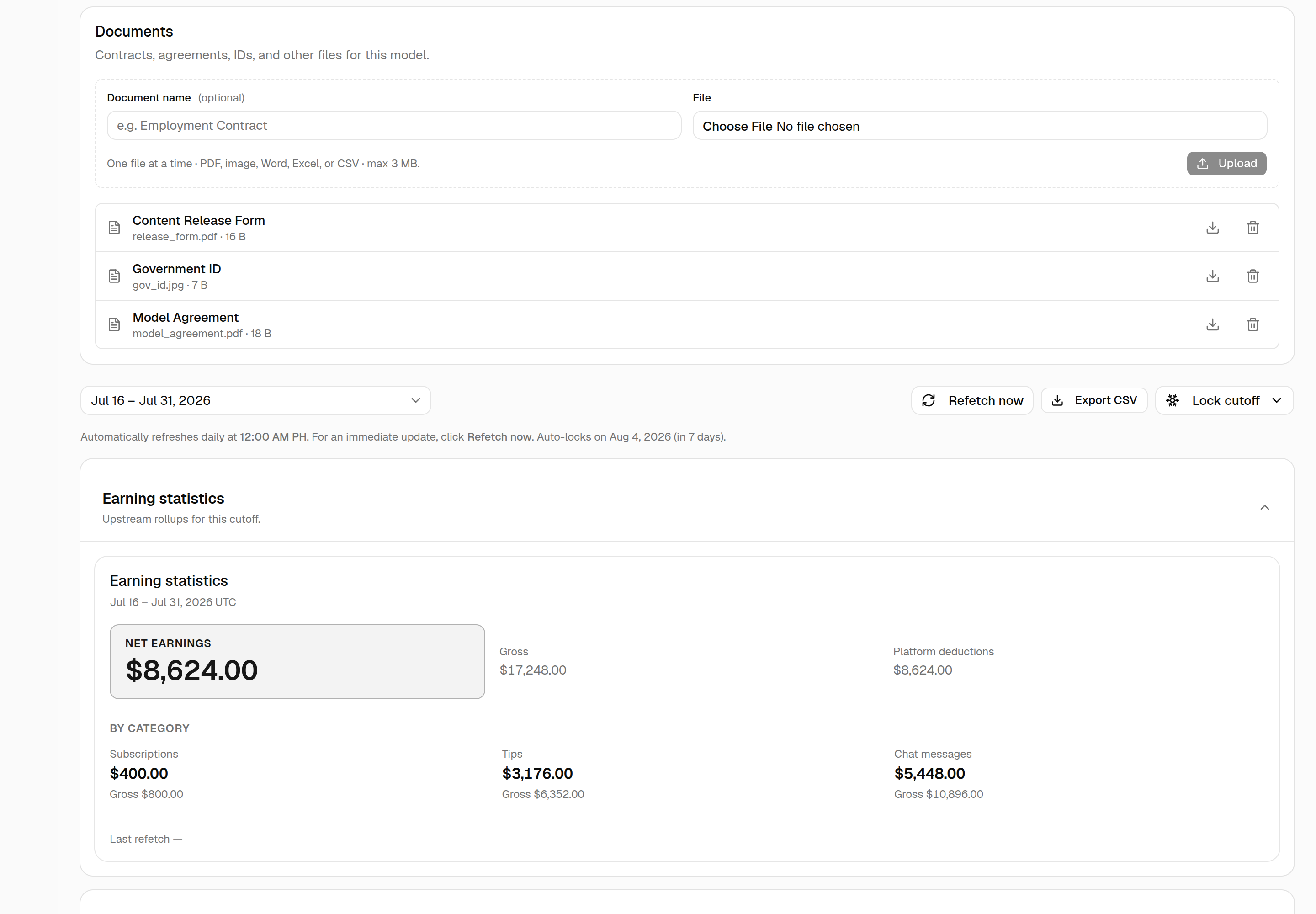
This is the same document management used on employee and external-contractor detail pages.
Troubleshooting
| Problem | What to do |
|---|---|
| A model's earnings look stale | Refetch that cutoff; check Last synced for the real pull time |
| Numbers changed after lock | Locking freezes the pulled figures for the cutoff — refetch before locking if needed |
| Session expired on a model | The account exists but its upstream session dropped — reconnect it upstream before refetching. Don't Replace |
| Account gone on a model | The account isn't listed upstream anymore, so it can't be fetched and the daily ingest skips it. Replace it with the creator's new account |
| The account list doesn't show an account | It's already linked to a model on the roster, or it isn't present upstream |
| Model has no earnings | Expected if it has no OnlyFans account; Refetch/Lock/Last synced stay blank |
| Stream operators paid nothing for a model's sessions | Check Stream commission available on the model — unticked means subs are counted but credit nobody |
| Ticked stream commission back on, pay didn't change | It books on the next Pull/Sync; already-finalized payslips keep their frozen amounts |
| Model not in SOT picker | Check the Username was set; the SOT session picker lists active models by username |
| Account won't attach to a model | It's already linked to another row (the list only offers unlinked accounts) — delete that row first, or use it directly |
| Detach is blocked | The row has locked cutoffs or ingested earnings — detach only works while it has none. If the creator moved to a new OnlyFans account, use Replace instead |
| Refetch says the earnings came from a previous account | The model's account was replaced; that cutoff predates the change and can't be re-pulled. Lock now seals it as-is, or Undo the change if it was a mistake |
| Replaced with the wrong account | Undo on the "Account replaced on…" note — works until the new account pulls earnings |